Case study · Government · Web · Payments
A ground-rent platform for Oyo State Housing Corporation.
01Problem
Ground rent was paid manually, and tracking was weak. Payers struggled to pay, and staff struggled to track debtors and records.
02Role
I was the lead product designer, working directly with the developers and the client. I owned the product design and direction end to end:
- UX research and journey mapping
- UI design and the design system
- Working with developers through build
03Process
- Research. I spoke to the client and stakeholders to understand how ground rent worked.
- Journeys first. I mapped the user journeys before designing any screens.
- Testing before build. I tested the designs with both the client and users before build, which led to revisions.
Constraints I designed within
- Government rules and approvals
- Payment gateway limits
- Existing records and data
- Low-bandwidth and older devices
04Solution
One web platform where residents pay ground rent and staff track what is owed.
For payers
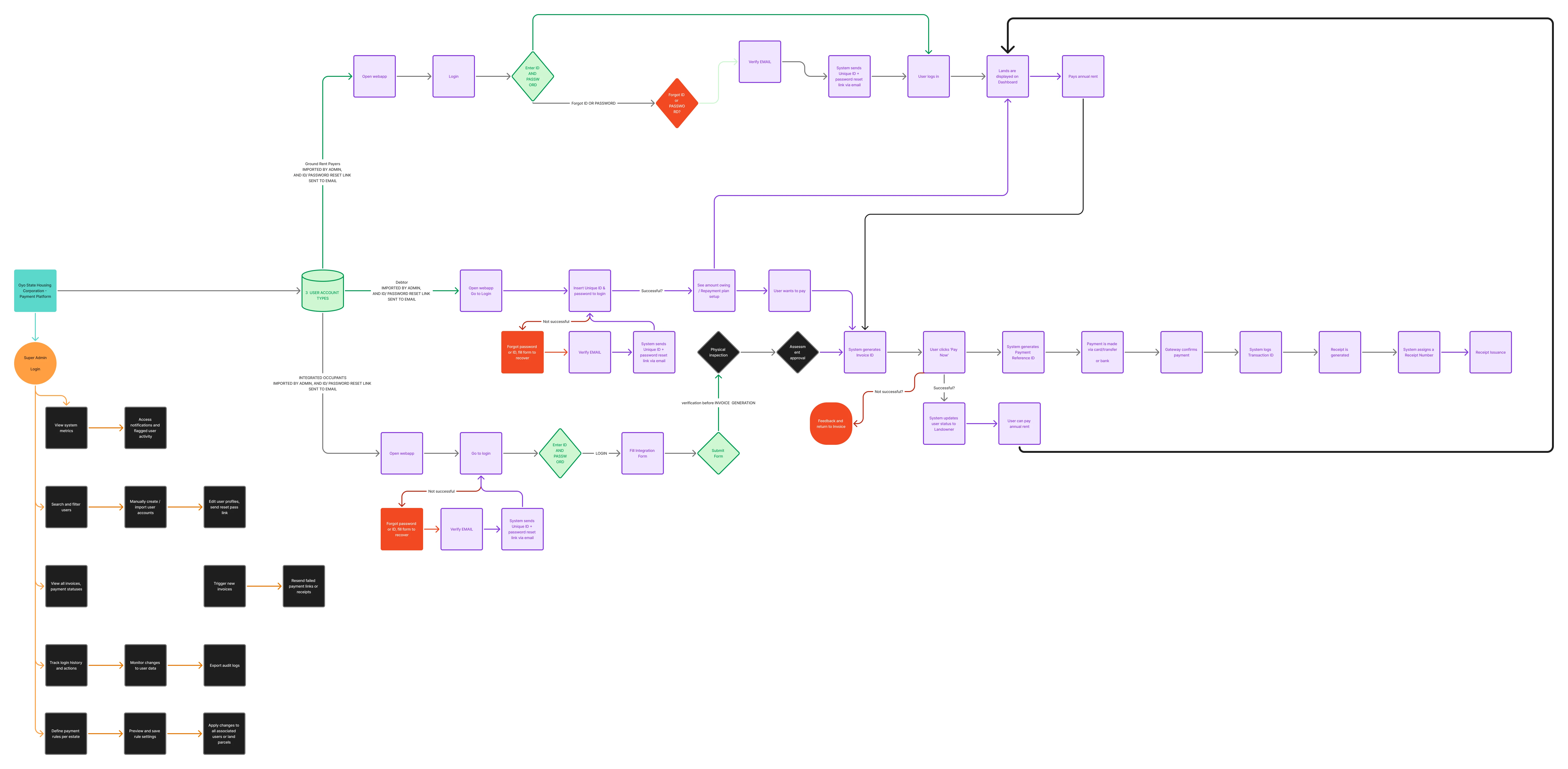
- Three types of user are covered: ground rent payers, debtors and integrated occupants.
- Sign-in uses a unique ID and password, with recovery by email if either is forgotten.
- A dashboard shows each user's lands. Debtors can see the amount owing and set up a repayment plan.
- Integrated occupants submit an integration form, which is verified, inspected and approved before an invoice is generated.
Paying rent
- The system generates an invoice ID. The user taps Pay Now and gets a payment reference ID.
- Payment is made by card, transfer or bank. The gateway confirms it, and the system logs a transaction ID.
- A receipt is generated and given a receipt number. If a payment fails, the user returns to the invoice with feedback.
For staff
- A Super Admin can view system metrics, notifications and flagged user activity.
- Admins can search and filter users, create or import accounts, and send password reset links.
- Admins can view invoices and payment statuses, trigger new invoices, and resend failed payment links or receipts.
- Login history, changes to user data and exportable audit logs support tracking and records.
- Payment rules can be defined per estate, previewed, saved and applied to all associated users or land parcels.
05Result
The platform went live.